Decrypting Havoc C2
Memory & Network Forensics / Reverse Engineering of the C2 Havoc.

Introduction
Havoc C2 is an open-source command and control framework used in post-exploitation operations by attackers and red-teamers. It allows an operator to control compromised systems, carry out remote commands, and move laterally in a network. It was first released on GitHub in October 2022 by C5pider and has since become widely used and actively developed.
Link of the Havoc project: https://github.com/HavocFramework/Havoc
In this article, we will analyze the behavior of the Havoc Demon by conducting memory and network forensics, as well as reverse engineering. This research was conducted more than two years ago.
Link of my project: https://github.com/BoBNewz/HavocC2Defense
Static analysis of the C2
By analyzing the Havoc Demon code, the malware generated by the C2, the header structure can be identified through comments in the source. It reveals several noteworthy elements, such as the size field, the command ID, the AES key, the AES IV, and a magic value. This magic value is particularly important, as it can be used to detect the demon.
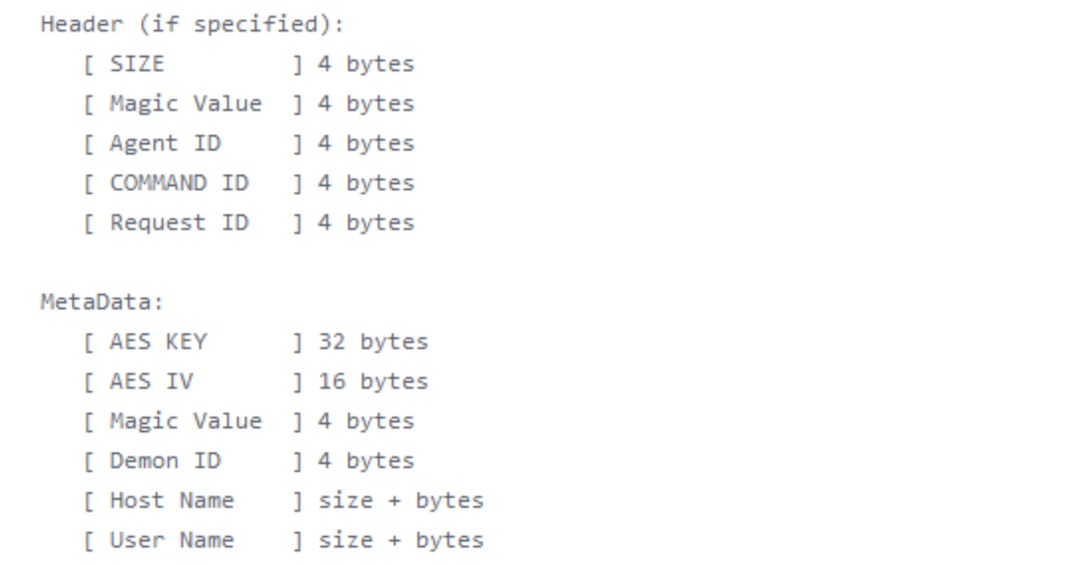 Havoc Header
The detection could be based on the usage of windows API. In the Havoc demon, these APIs are resolved dynamically using addresses defines in the source code.
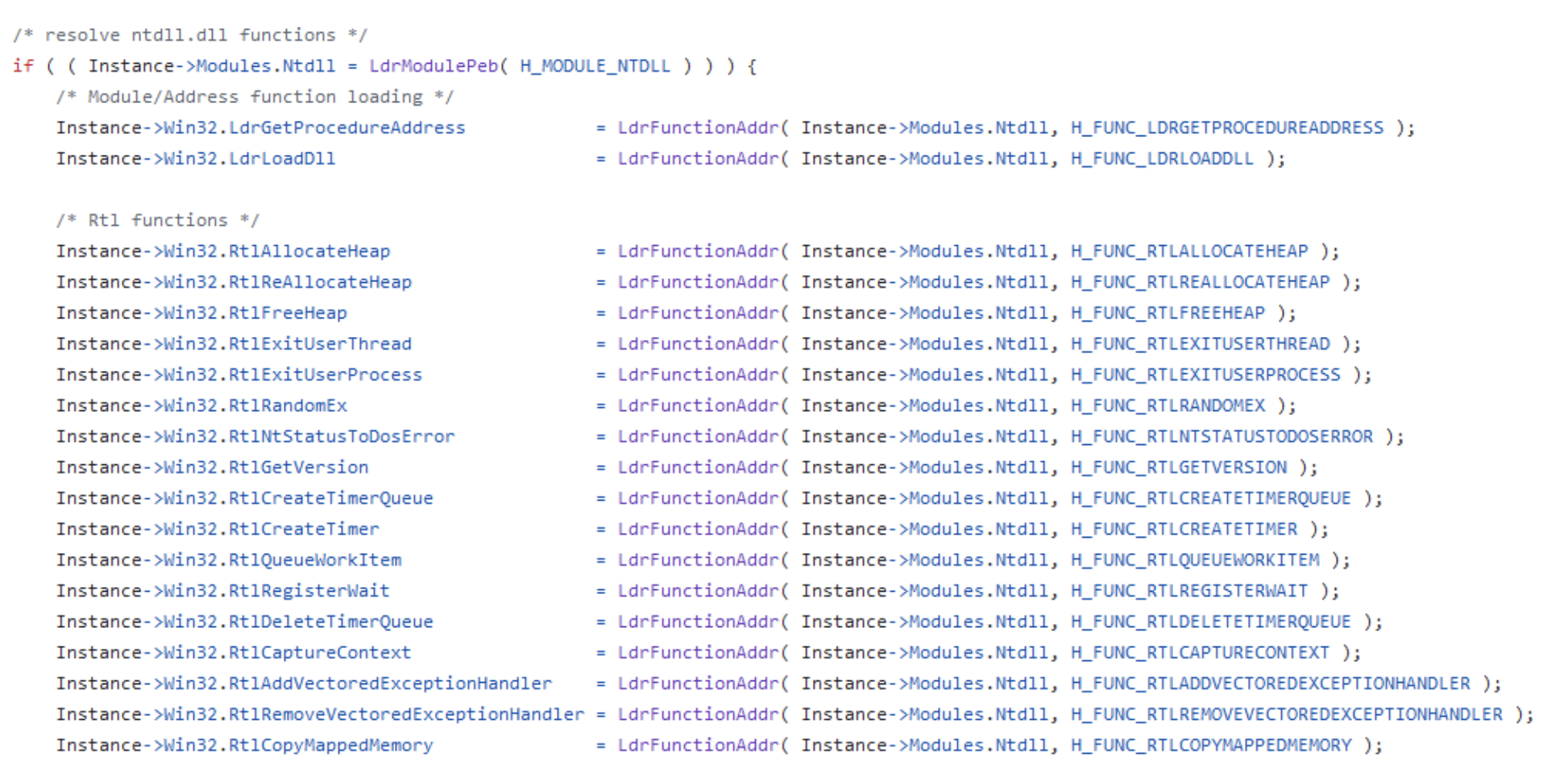 Dynamic APIs
A review of the Defines.h file reveals the static definitions of various API addresses. These same addresses should be identifiable during the reverse engineering phase of the compiled Demon executable.
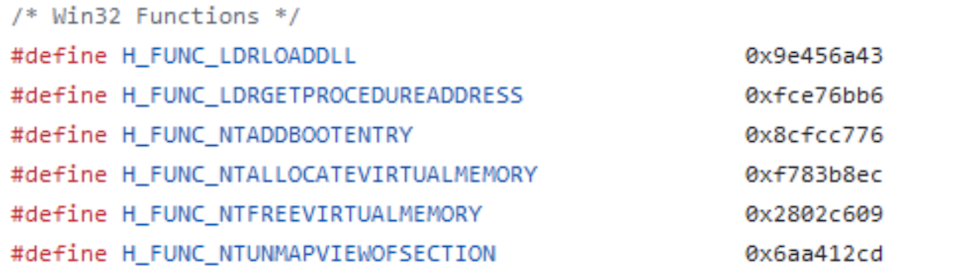 API addresses
By the way, the magic value is also defined in the file: 0xDEADBEEF.
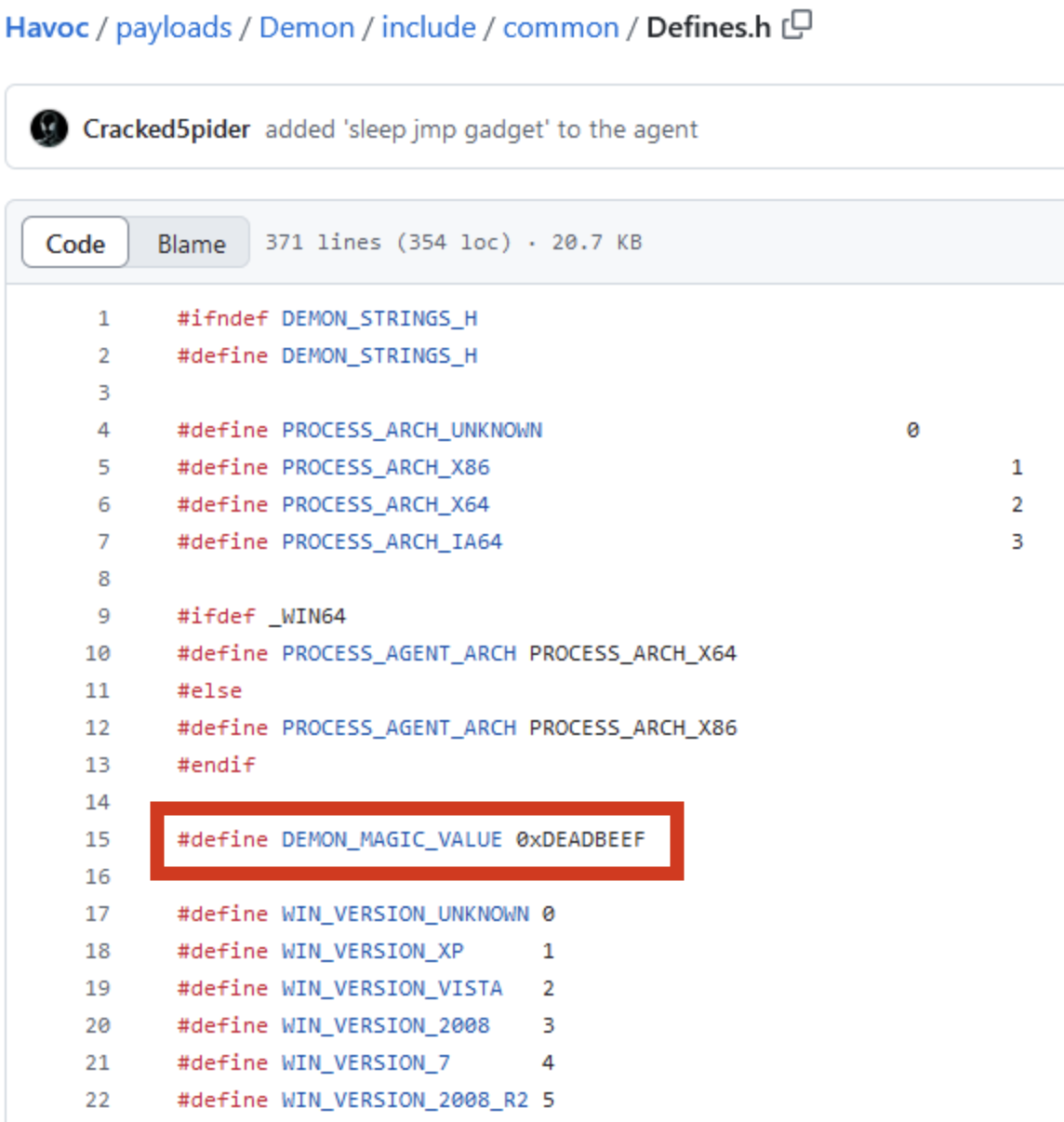 Magic Value
Reverse Engineering
Upon decompiling the Demon, the API addresses are identified at specific offsets. Within Ghidra, we can observe that these addresses are passed as arguments, with the call mnemonic subsequently executing the targeted API functions.
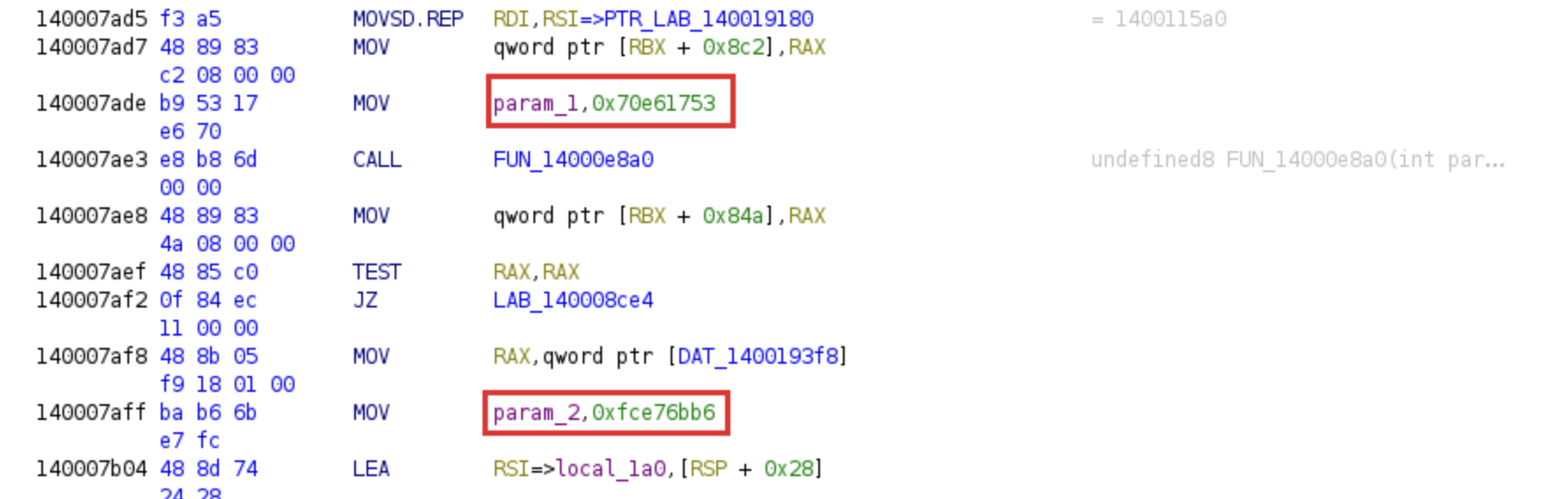 API functions passed as arguments
As illustrated in the left-hand pane of Ghidra, the memory addresses are represented in little-endian format.
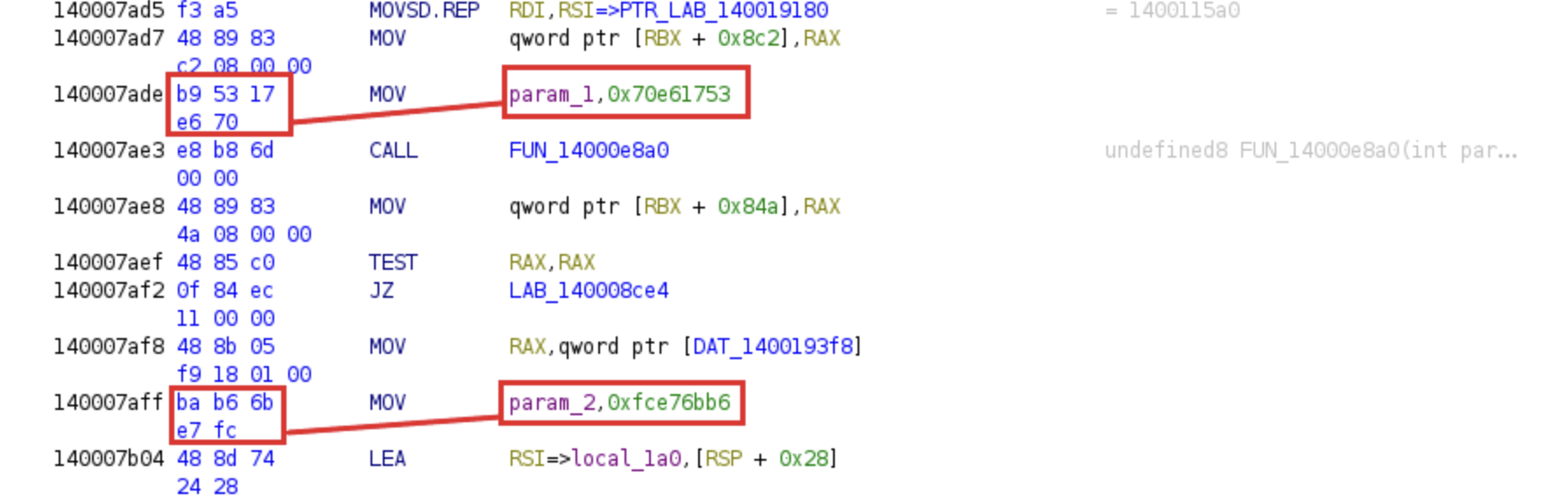 Little-endian API functions
Yara rule creation
Following this step, the functions defined in Defined.h can be exported to a text file. A Python script is then utilized to parse these entries and reformat the addresses, ensuring full compatibility with Yara syntax.
1
2
3
4
5
6
7
8
9
10
11
12
13
14
15
16
17
18
19
20
21
22
23
24
25
26
27
import re

with open("win32_function.txt", "r") as file:
    text = file.read()

pattern = r'#define\s+(\w+)\s+(0x[0-9a-fA-F]+)'
matches = re.findall(pattern, text)

def inverse_hex(value):
    value = value[2:]

    value = value.zfill(8)
    byte1 = value[6:8]
    byte2 = value[4:6]
    byte3 = value[2:4]
    byte4 = value[0:2]

    return f"{byte1} {byte2} {byte3} {byte4}"

i = 1
for match in matches:
    name = match[0]
    hex_value = match[1]
    inverted_hex = inverse_hex(hex_value)
    s = "$function" + str(i)
    i+=1
    print(s + " = {" + inverted_hex + "} //" + name)
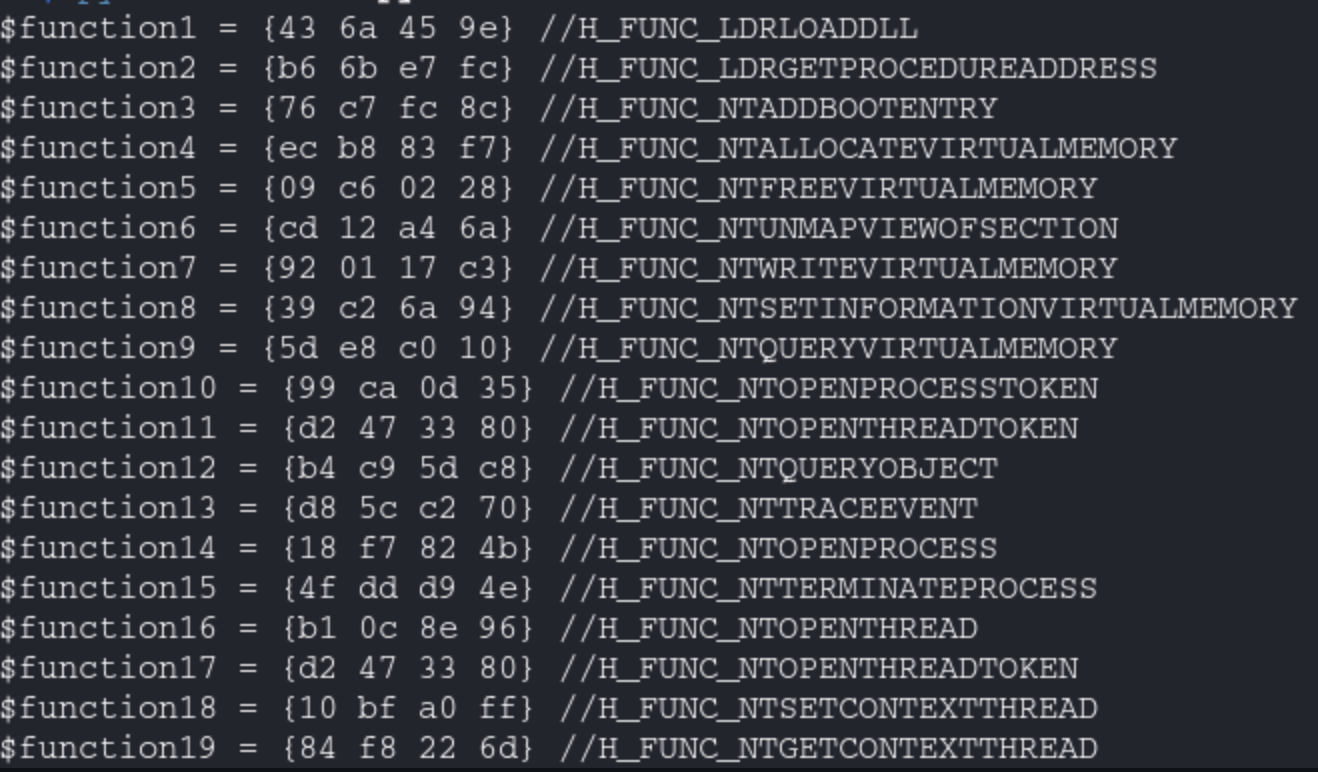 Output of the python script
The yara rule can be created.
1
2
3
4
5
6
7
8
9
10
11
12
13
14
15
16
17
18
19
20
21
22
rule havoc_win_api_dynamic_resolution {

    meta:
        description = "Detect Havoc C2 using Win32 API dynamic resolution"
        author = "@BoBNewz"

    strings:

        $function1 = {43 6a 45 9e} //H_FUNC_LDRLOADDLL
        $function2 = {b6 6b e7 fc} //H_FUNC_LDRGETPROCEDUREADDRESS
        $function3 = {76 c7 fc 8c} //H_FUNC_NTADDBOOTENTRY

        ...

        $function315 = {fe 00 80 8f} //H_COFFAPI_NTGETNEXTTHREAD
        $function316 = {f0 1d d3 ad} //H_MODULE_KERNEL32
        $function317 = {53 17 e6 70} //H_MODULE_NTDLL

        condition:

        10 of them
}
Link of the Yara rule: https://github.com/BoBNewz/HavocC2Defense/blob/main/havoc.yar
Havoc network analysis
The analysis began by simulating HTTP traffic between the target host and the Havoc C2 server, while simultaneously monitoring the network via Wireshark. This allowed for the capture of the Demon initialization sequence, as well as subsequent command executions and file transfers.
Examination of the PCAP revealed distinct Command IDs transmitted from the agent to the C2:
- 63: Demon Initialization
- 1: GetJobs
While the agent consistently includes a standard header in its communications, the initialization phase is particularly critical as it transmits the AES key and IV in cleartext or a recoverable format.
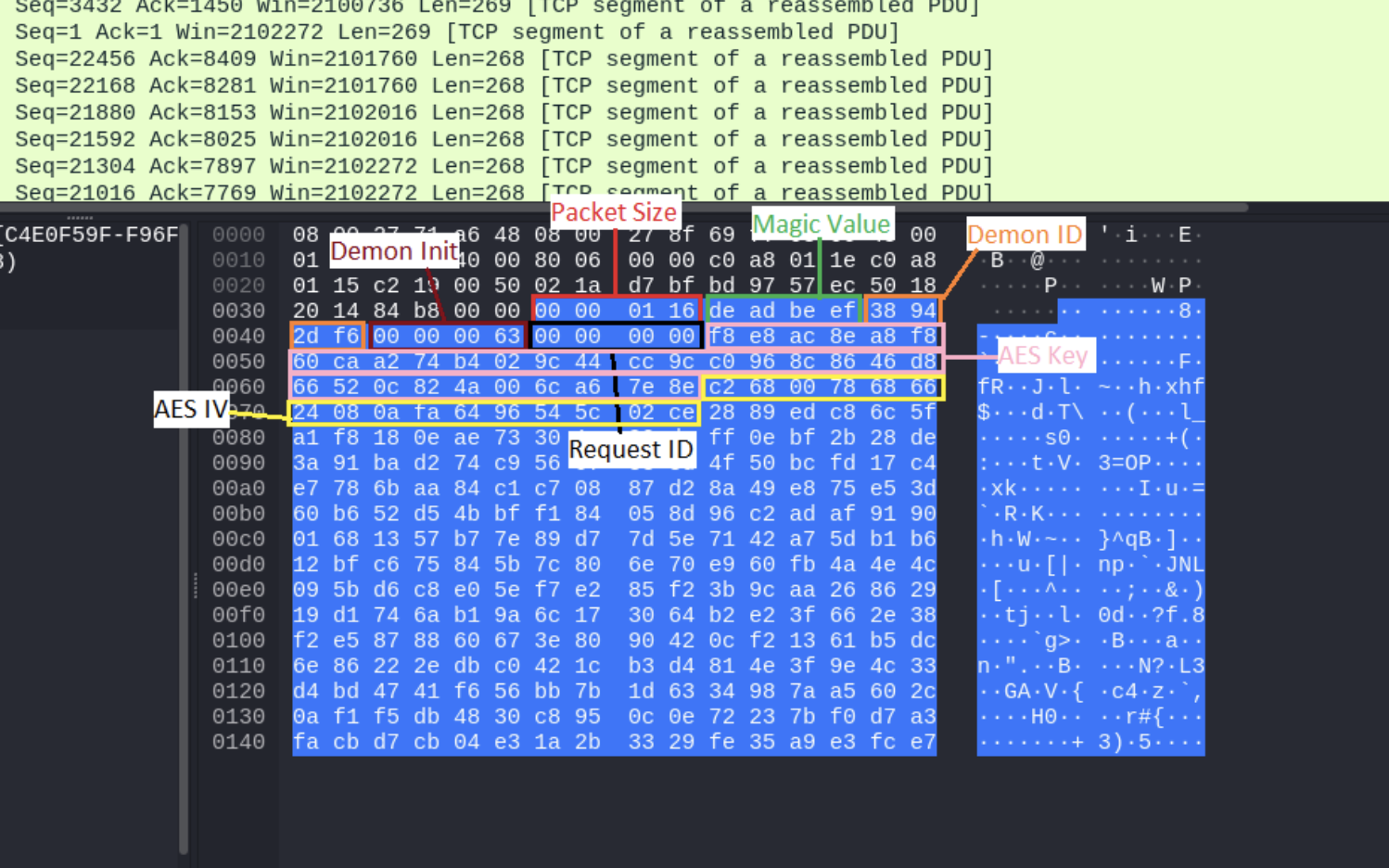 Header of the demon
Once the AES parameters have been successfully retrieved, they can be utilized to decrypt the remaining network traffic. A critical prerequisite for this process is the stripping of the packet headers, ensuring that only the raw ciphertext is processed during decryption.
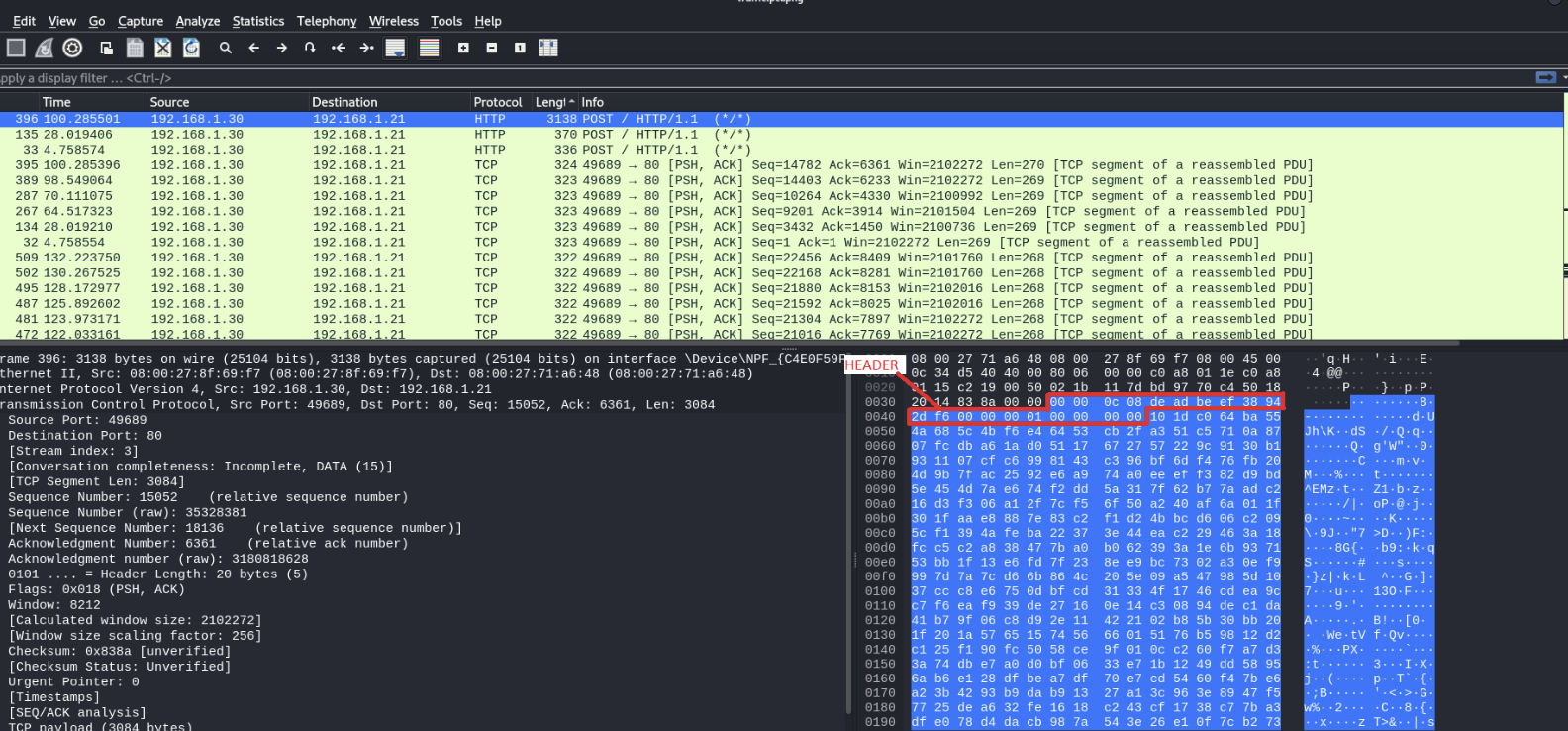 Encrypted packet
The packets can be decrypted using CyberChef.
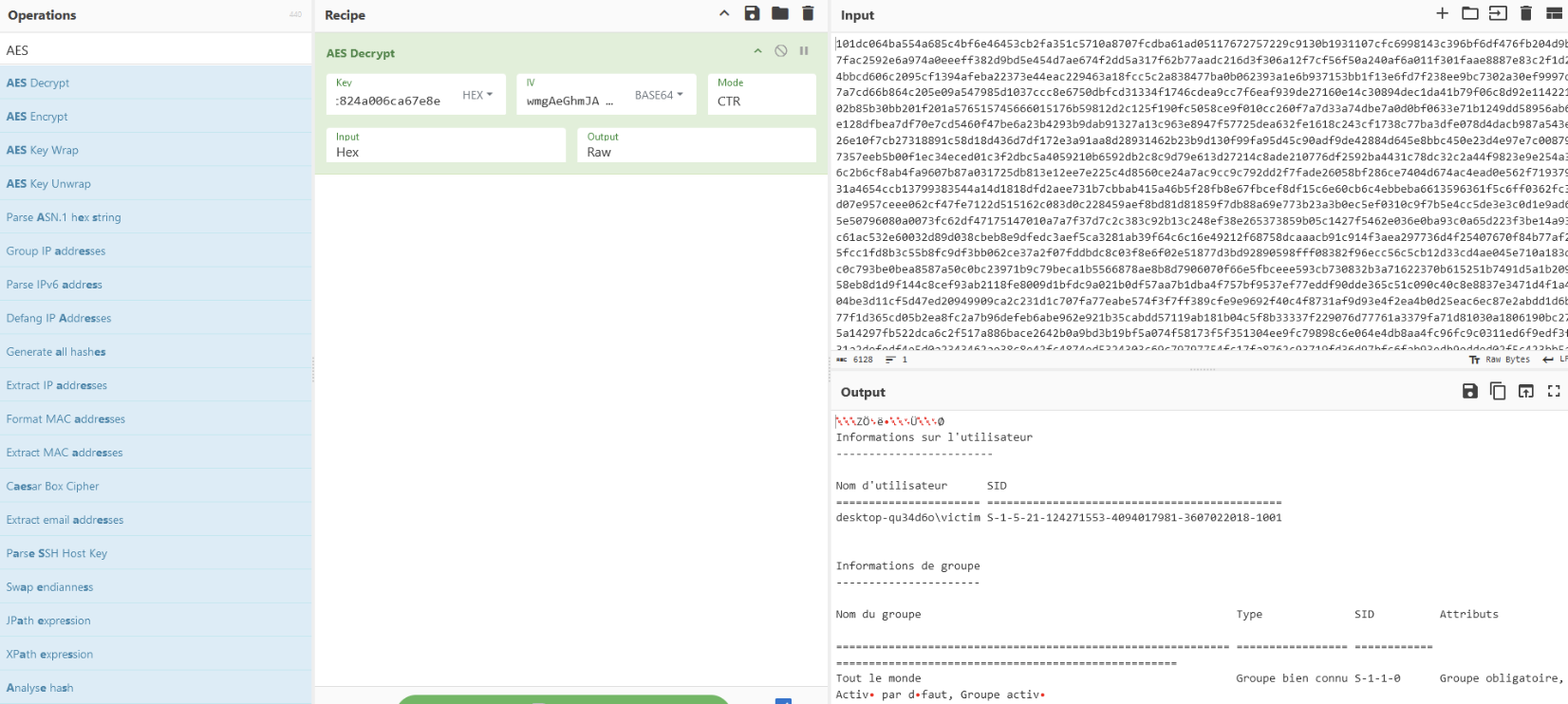 Decrypted packet
After successfully isolating the AES keys, the decryption of network packets was the next logical step. I developed a custom Python utility to automate the identification of cryptographic keys and the subsequent decryption of C2 traffic, requiring only the AES key, IV, and C2 IP address. Due to specific character encoding constraints, the script was designed to output the results directly to files to ensure data integrity.
Due to installation issues with Pyshark, I utilized the pre-configured Python environment provided in the repository to ensure compatibility. I also created a docker image.
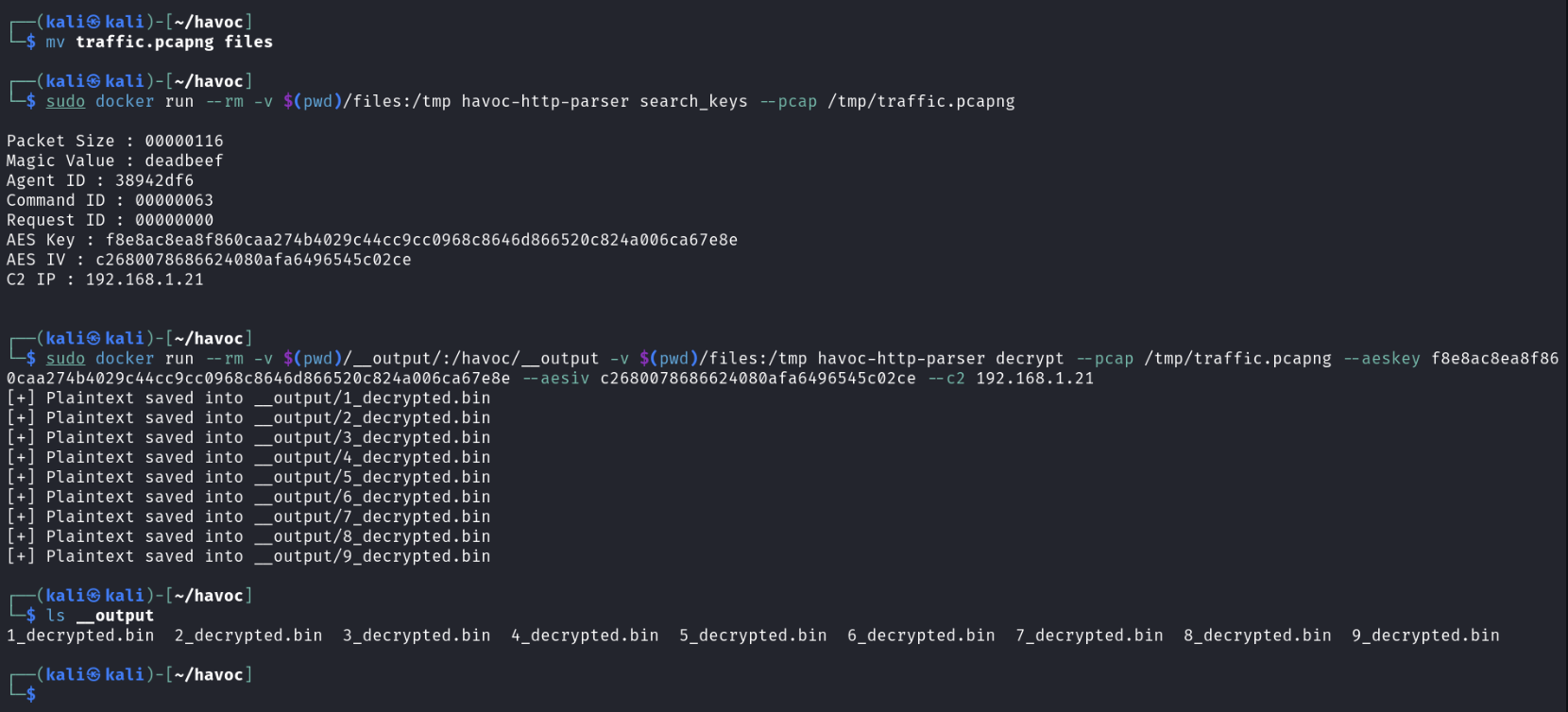 Execution of the tool
 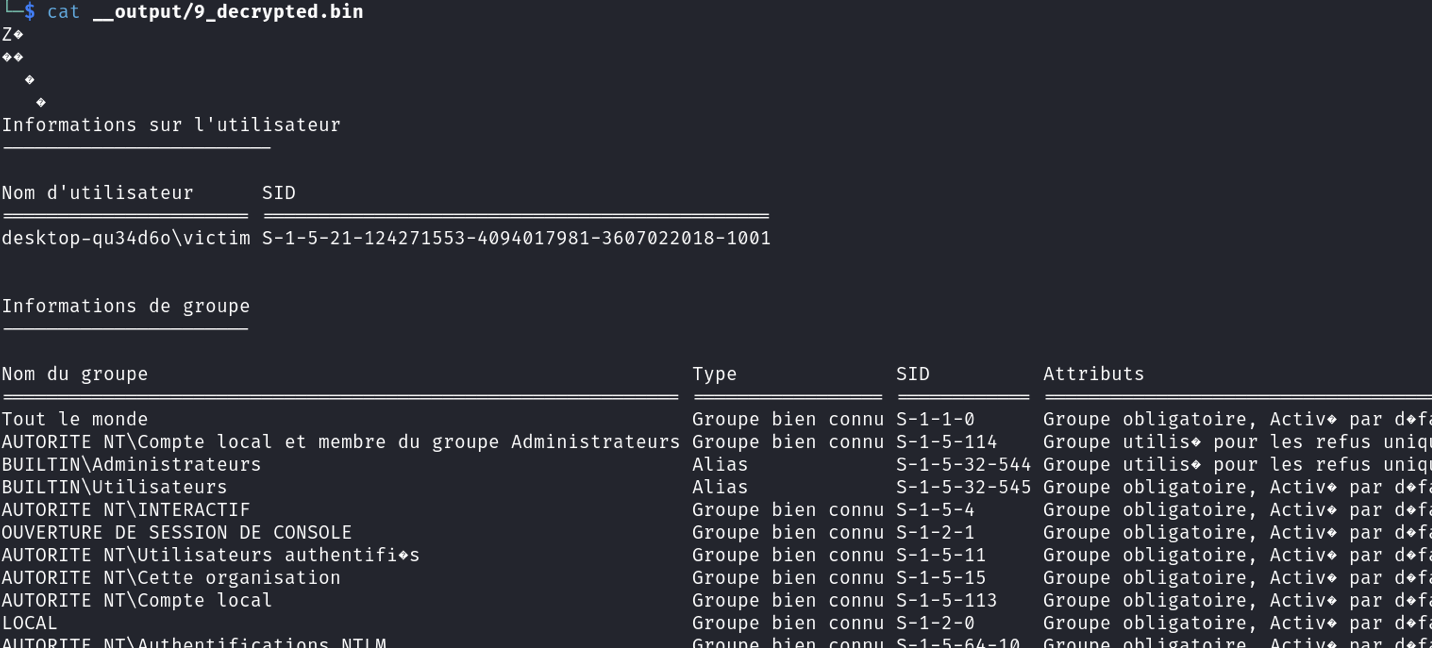 Decrypted data
Link of the file: https://github.com/BoBNewz/HavocC2Defense/blob/main/Havoc_HTTP_Parser/havoc-http-parser.py
The Demon initialization phase is not always present in network traffic captures (PCAPs), as it may occur outside the recording window. Consequently, alternative methods for extracting AES parameters were explored, leading to an initial investigation centered on volatile memory analysis.
Havoc memory analysis
For the rest of the blog, a separate Demon agent was deployed, utilizing a unique AES key and IV.
A full memory capture of the target system was performed using DumpIt while the agent was active.
The initial phase of the investigation involved extracting the relevant process from the memory image via Volatility 2.
 Dumping process using volatility2
The memory dump can be inspected using a hex editor to locate the DEADBEEF magic value.
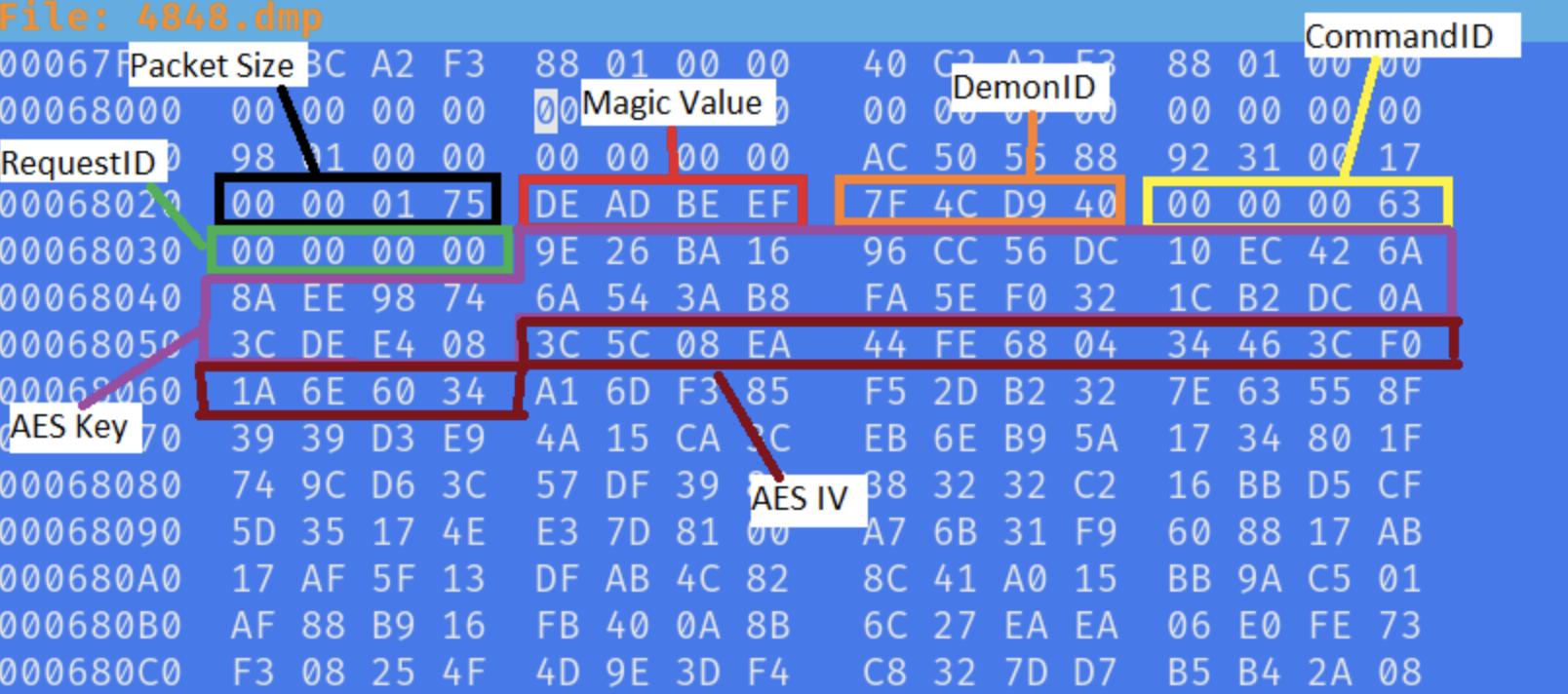 Hexdump of the dumped process
This approach allows for the recovery of the complete header.
Leveraging these structural insights, a regular expression (Regex) can be developed and integrated into a custom Volatility plugin for automated detection.
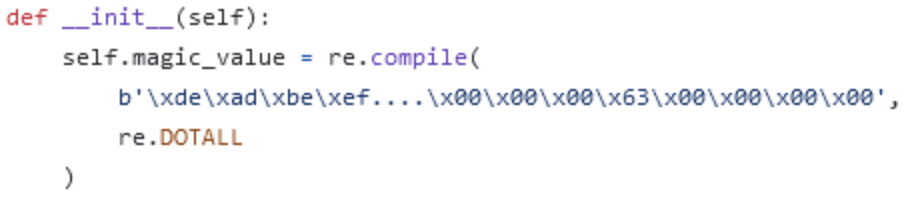 Created regex
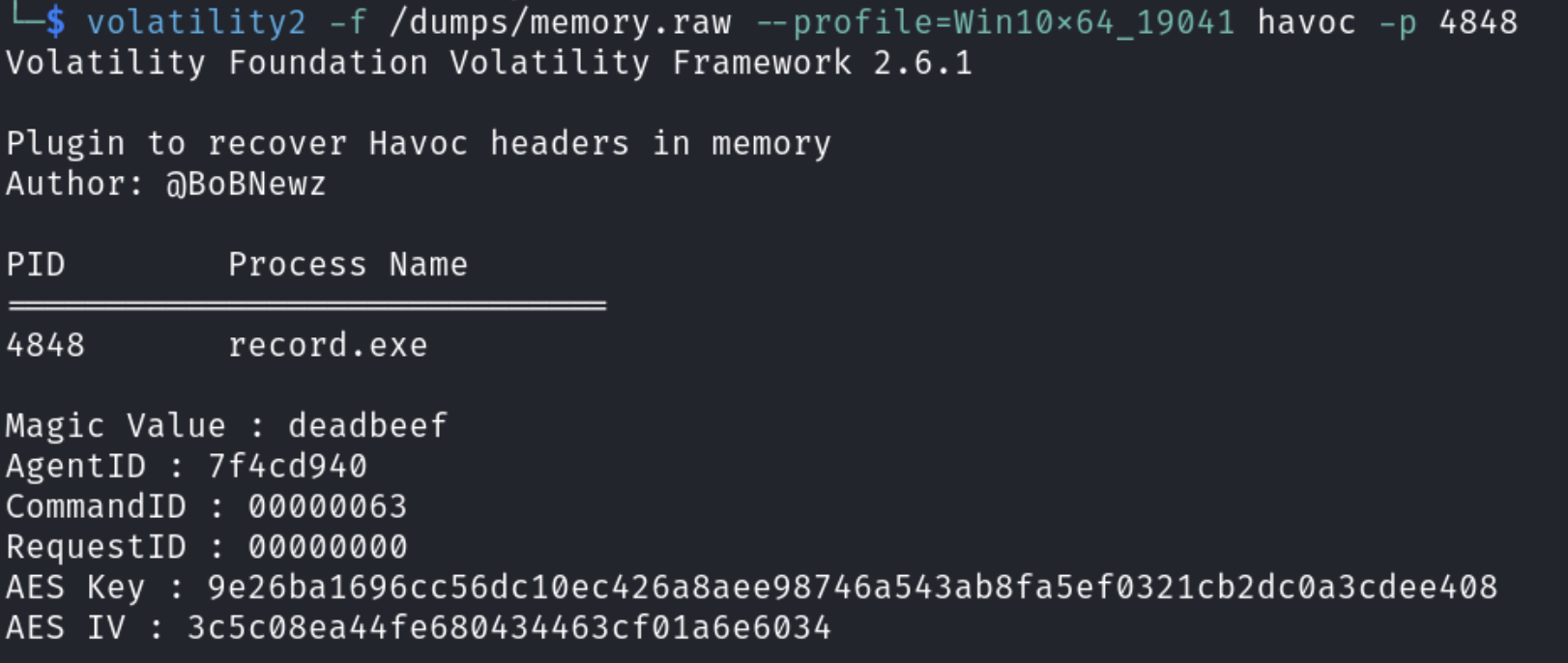 Execution of the volatility module
Link of the volatility2 plugin: https://github.com/BoBNewz/HavocC2Defense/blob/main/volatility/vol2/havoc.py
Next Steps
- Implementation of HTTPS Analysis
- Develop a volatility3 plugin (also available here: https://github.com/Immersive-Labs-Sec/HavocC2-Forensics)